
Author: user

  • Designing a Culture of Ownership

    Designing a Culture of Ownership

    Ownership isn’t a slogan or a catchy line on a poster. It’s a behavior, a rhythm in how people think and act. When someone feels truly responsible for the outcome, they anticipate problems, balance trade-offs, and make better calls on their own. The manager’s job? Make that kind of behavior normal, easy, expected. The changes below show how to build real ownership into daily work.

    Give outcomes, not chores

    Ownership starts with how you describe the work. Don’t hand people a checklist. Say what result you actually need, who it’s for, and how you’ll know it worked. A single line can pull a lot of weight: “Shorten onboarding from twelve to seven days for new customers.” That’s context, direction, and the expected result.

    Then, step back. Let them figure out the path. Ask for a plan: what they’ll try first, what they’ll try in two weeks, and when you need to help. It keeps the work in their hands but still gives you visibility. If they stall, guide with questions instead of instructions. That way, the answer still feels like theirs.

    Name the owner and what they control

    Every project needs one owner, clearly named, with a list of what they can decide without waiting for permission. Write it clearly: “Maya owns this project. She can adjust scope within budget, choose vendors under $5K, and approve the final deliverable.”

    Set a few guardrails – legal, brand, or major spending – and let them handle the rest. When questions pop up in chat, redirect folks to the owner. Over time, people stop defaulting to the manager for every small call.

    Keep progress visible

    Choose a few metrics like cycle time, quality, adoption, change in revenue, and track them in one place. A brief weekly update should be enough.

    Tone matters a lot. Don’t use metrics against people. Use them to learn, not to judge. If something gets worse, ask, “What did we learn?” Instead of panic, you’ll get curiosity. Over time, people see how their decisions link directly to results.

    Reward action and honest learning

    If praise only shows up when things go perfectly, no one will risk leading. Celebrate early demos and smart trade-offs. When something goes bad, do a short review. Focus on what to change next time. Thank the owner for being honest.

    Speed helps. Deliver in small pieces to get quick feedback. A pilot, a prototype, a limited rollout, each one gives space to act, and pivot.

    Clear the path, don’t block it

    Managers grow ownership by removing friction. Respond fast to real blockers and actually follow through. A same-day answer, a quick call, or a reviewed doc can help the team. If you notice the same problem across projects, fix it at the system level.

    Watch handoffs between teams. When work goes between teams with no one owning the full flow, assign a temporary end-to-end owner. They stay with it until it’s running smoothly. Customers get one clear contact. Once things stabilize, normal ownership lines can resume.

    Final thought

    Ownership doesn’t grow from slogans – it grows from structure. Name real owners and what they can decide. Track simple metrics and learn from them. Praise initiative, speed, and open learning. Clear blockers before they pile up.

  • Leading Without Burnout: A Manager’s Guide

    Leading Without Burnout: A Manager’s Guide

    Work–life balance is often described as a “nice to have.” In practice, it is a reliability issue. When people are rested, they think clearly. They communicate better. They make fewer avoidable mistakes. Over time, that becomes a real business advantage.

    Managers influence this more than they realize. Not through speeches, but through daily signals. What gets rewarded. What gets escalated. What gets planned, and what gets dumped into evenings “just this once.” Those patterns become culture.

    The habits below help you protect time without lowering standards. They also reduce the need for heroics. That matters, because heroics rarely scale.

    Set a clear example with boundaries

    People watch what you do more than what you say. If you work late, use schedule-send. Let your message arrive during business hours. If you need something urgently, state that clearly.

    Pay attention to what you praise. If you reward “saving the day” every week, you are rewarding a broken system. Recognize clean planning, early risk calls, and good handoffs. Those are the habits that reduce late work.

    Plan work like capacity is real

    Overload often starts with good intentions. You want to support stakeholders. You want to move quickly. Then the team carries too much at once, and evenings become the only place left to finish.

    A useful discipline is to plan with an honest view of time. Not ideal time. Real time. Include review cycles. Include testing. Include support requests and interruptions. Those are not exceptions. They are normal.

    Keep priorities visible. A short list that the team can see helps more than long project plans that no one reads. It also prevents quiet “priority inflation,” where everything is treated as urgent.

    Reduce mid-week priority swings

    Constant switching is exhausting. It also slows output. People lose context, restart work, and miss details. Then they stay late to recover time that was lost to churn.

    Weekly planning helps. Protect that focus unless something truly urgent appears. When new requests come in mid-week, triage them. Some can wait. Some can be scheduled. A small number may be urgent.

    If something is urgent, replace an existing task with the new work. Otherwise you create a silent rule: new work always stacks on top of old work. That rule leads to overtime.

    Make escalation calm and predictable

    Late nights often come from surprises. A customer issue arrives with no owner. A system breaks and everyone jumps in. A “quick question” becomes a two-hour fire drill. Predictable escalation reduces this.

    Start by defining what counts as urgent. Keep the definition narrow. Urgent should mean real impact, not discomfort. It helps to write a short rule that fits in one sentence.

    Then design the path. Who is first to respond? Who supports? Who communicates updates? If coverage is needed, rotate it. The same people should not carry the burden every time.

    Delegate decisions, not just work

    Many teams work late because decisions are delayed. A task is done, but it cannot move forward. It waits for a manager’s approval. Then it gets approved at the end of the day, and the team scrambles to finish.

    Push decision-making closer to the work. Give people ownership areas, and the authority to decide within clear guardrails. Guardrails matter. Without them, delegation feels risky. With them, it becomes predictable.

    Guardrails can be simple. A checklist. A few examples of good outcomes. A budget limit.

    Cut meeting noise and protect focus time

    When calendars fill up, work does not disappear. It moves into evenings. That is one of the most common paths to burnout, and it is easy to miss because meetings look like work.

    Review recurring meetings regularly. Remove meetings that do not lead to decisions, shorten the others. A 30-minute meeting forces preparation so it often works better than an hour-long meeting.

    Use written updates for status where possible. Status meetings are often repetitive.

    Treat recovery as part of the plan

    Recovery is not only “time off.” It is also lower-intensity time that allows people to regain control. Without it, teams stay in sprint mode for months, and that drains quality.

    Encourage people to plan PTO early. Then build coverage so vacations are real. A vacation with constant messages is not recovery. It also sends the wrong signal to others.

    After major pushes, schedule a lighter period. Use it to write documentation and tests. These tasks often get pushed aside, then they create problems later. A planned light week prevents that.

    Manage stakeholder urgency with clear trade-offs

    A lot of overtime is created outside the team. Stakeholders ask for speed. They want certainty. They may not see the cost. Your job is to translate requests into trade-offs.

    When someone asks for a faster deadline, respond with options. Reduce scope. Deliver in phases. Move the date. Increase support. These are real levers. “Just work harder” is not a lever. It is a short-term loan with high interest.

    Conclusion

    Work–life balance improves when work is designed to fit human limits. That does not reduce performance. It protects it. Set the example with boundaries. Plan with real capacity. Keep priorities stable. Make escalation predictable.

    Over time, these habits create a team that delivers steadily. Not just in one intense quarter, but year after year.

  • Build a Strong Business–IT Partnership

    Build a Strong Business–IT Partnership

    Build a Strong Business–IT Partnership

    A strong business–IT partnership is one of the most practical ways to reduce delays, avoid rework, and deliver changes that actually improve how the organization runs. In many companies, the tension is familiar. Business teams feel blocked by process and technical constraints. IT teams feel constant whiplash as priorities change midstream, requirements remain unclear, and timelines are set before the work is properly understood.

    The root issue is usually not effort or intent. It is misalignment. Strong business-IT partnership can be built with practical habits. You need shared language and shared decision-making.

    Agree on outcomes before implementing solutions

    Many conflicts start because teams jump straight to solutions. The business asks for a new dashboard, a new workflow, or a new tool. IT responds with constraints, risk concerns, or a long delivery estimate. It’s possible that both sides are right, but they are arguing too early.

    Discuss outcomes, not features. Include the problem, the group affected. After that discuss what needs to be improved, and what constraints matter most. Constraints are not only technical. They include compliance, customer experience, etc.

    Build shared domain knowledge on both sides

    Partnership breaks down when business and IT do not understand each other’s world. Business teams may not see the hidden work behind a change, such as data cleanup, identity access, testing, etc. IT teams may not see the practical context, such as customer expectations, or the cost of delay.

    It is very beneficial to have shared domain knowledge. When people understand the business and the technology environment, they make better decisions together.

    You can build shared domain knowledge by following simple steps:

    • Invite IT to sit in on customer support reviews.
    • Invite business leaders to join post-incident reviews and roadmap discussions.
    • Have product owners and analysts spend time with users, not only with stakeholders.

    Make prioritization visible and decision-driven

    A partnership cannot survive if priorities change constantly without a clear reason. Business sees a backlog and wonders why nothing moves. IT sees requests arriving from five directions and wonders how to say no.

    The fix is transparency. Use one backlog for change work, even if different teams execute it. Regularly review it with business and IT. Weekly works well for operational delivery and near-term scope decisions. Monthly works well for roadmaps.

    The important part is not the meeting. It is the clarity around decisions:

    • What is in the next delivery window, and what is not.
    • What trade-off was made, and why.
    • Who has authority to approve scope cuts, timeline changes, or risk acceptance.

    Co-own results, not just delivery milestones

    Many organizations still operate with a handoff mindset. Business sponsors the work. IT delivers it. Then everyone argues about whether it succeeded.

    A better model is shared ownership of outcomes. It includes having multidisciplinary teams that combine business and IT expertise.

    To start pick one business area such as onboarding, or billing. Form a small team that includes business and IT roles. Give the team permission to solve the problem end-to-end.

    Create a relationship role that is more than ticket intake

    A partnership needs active relationship management, especially in larger organizations. This is not about adding bureaucracy. It is about creating a clear bridge between demand and delivery.

    The bridge helps to:

    • Keep communication open and consistent.
    • Help shape requests into practical requirements.
    • Protect delivery teams from constant changes.

    Treat reliability, security, and technical debt as shared priorities

    One of the fastest ways to damage trust is to treat platform health as “IT’s problem” and feature delivery as “the business’s problem.” Customers and employees do not experience the organization that way. They experience one service.

    If a system is unstable, every new feature becomes a risk. If security gaps exist, the business carries the exposure, not only IT. If technical debt grows, delivery slows down, even when people are working hard.

    The practical fix is to plan capacity on purpose. Allocate time for new capability, but also allocate time for reliability work, security improvements, and the changes that reduce future delivery friction. Make that allocation visible in the roadmap so it does not feel like hidden work.

    Use a small set of shared measures and review them honestly

    Metrics can strengthen partnership, but only if they support learning instead of punishment. You need a few measures that both sides agree represent value and help with delivery.

    In practical terms, choose measures like these:

    • Adoption by the intended group
    • Reduction in errors, rework, or support contacts tied to the change
    • Delivery cycle time
    • Service reliability and incident frequency for the product area

    Review the measures together, and treat surprises as signals to investigate, not proof that someone failed.

    Start with one stream, build trust, then scale

    Pick one business area where the pain is obvious and the work keeps coming. Put one business lead and one IT lead on it, and make sure they stay involved. Keep priorities visible.

    After a few weeks, you should be able to tell if it is working. Are requests clearer? Is the backlog calmer? Are fewer items bouncing back and forth? If yes, take the same approach to the next area and adjust as you go.

  • Protect Focus Time as a Policy, Not a Preference

    Protect Focus Time as a Policy, Not a Preference

    Whenever focus time isn’t required, meetings plus constant updates push it aside. Turn it into a rule – work improves in quality, speed, while pressure drops. Below: four straightforward approaches.

    Company Quiet Hours & Personal Focus Blocks

    Goal

    Set aside protected periods for focused tasks – each person gets their own slot without disruptions.

    How to implement

    • Establish quiet periods – like 9:30 to 11:30 a.m., Monday through Thursday, your local time. Internal meetings are off-limits unless there’s urgency or a set client discussion.
    • Request every team member to schedule two 90-minute slots daily labeled “FOCUS – Do Not Book.” Ensure these appear clearly in calendars.
    • Across regions, set silent periods – this way each center gains undisturbed windows. Regional coordination ensures no team overlaps peak focus times.

    Meeting Rules & Clean Calendars

    Goal

    Cut extra meetings; give back hours for deep tasks while keeping teams on track.

    How to implement

    • Stick with 25- or 50-minute sessions by default.
    • Set aside a no-meeting block weekly – say, Wednesdays early – and ask managers to follow. Use this time for focused work instead of calls. Let teams adjust their schedules around it slowly. Show consistency by sticking to the plan each week.
    • Let recurring meetings expire each quarter – unless someone takes charge, sets a purpose, plus adds a clear plan.

    Batch Messages Instead of Always-On Chat

    Goal

    Stay on task without blocking teamwork.

    How to implement

    • Request staff to review messages at set times – like midday or late afternoon – to reduce distractions throughout the day.
    • Set clear reply guidelines: many messages get replies within 24 hours; for time-sensitive needs, use a phone call or add an obvious note.
    • Set status markers like “In Focus” in silent periods – this signals you won’t answer right away.

    Use Focus-Friendly Tools & Spaces

    Goal

    Enable effortless entry into – also maintenance of – deep work mode.

    How to implement

    • Set uniform Focus settings at set times – mute alerts that aren’t urgent. Use consistent Do Not Disturb rules during calm periods – disable low-priority pings.
    • Offer quiet spaces or directions to calm zones; permit noise-blocking earphones when necessary.
    • Provide basic task outlines – like short briefs or lists – to help users begin focused work right away, since they won’t need to search for details. Instead, everything’s ready at a glance.
    • Set up your first task for tomorrow right before ending today’s work. This simple step helps start the day with clear direction – just decide what to tackle first, then finish your current session. Doing this builds momentum without extra effort later on.

    Shielding focus means shaping the week, not pushing effort. Use silent periods, tidy schedules, limit disruptions, group communications, then back intense tasks with proper gear and areas. Once bosses clarify such rules – and stick to them – groups complete more key work faster, standards improve, stress drops.

  • Why Employee Learning Is Every Company’s Secret Advantage

    Why Employee Learning Is Every Company’s Secret Advantage

    In quick-changing markets, success doesn’t come from features – but from how fast people grasp new things then use them. Because staff stay up-to-date, groups adjust quicker, deliver better results, while running smoother. Six clear reasons show why ongoing growth belongs in every role, along with simple steps to actually follow through.

    Faster adjustment when things shift

    New tools, rules, and shifting demands pop up every week. Because learning never stops, teams adapt smoothly – change turns into forward motion. When rolling out a CRM, data system, or smart helper, it’s more like a steady dash than a drawn-out pause.

    A smart step: pick a learning target every three months that links to real work outcomes – like “Learn the updated analysis software so reports take less time.” .

    Improved results through fewer corrections

    Gaps in skill often lead to errors, repeated work, or miscommunication. When teams learn early, issues are caught before turning into problems. A common grasp of safe coding practices, clean data handling, and clear documentation lifts both basic performance and peak output. Results include smoother deployments, less urgent troubleshooting, while reducing stress during support duties.

    A smart step: once big jobs finish, hold a short 15-min review. Use that time to capture key takeaways – pick the strongest three insights. Shape them into a simple checklist or reusable format others can follow easily.

    Improved involvement, longer stays, also movement

    People remain in places where they develop. When growth opportunities are clear – while practical application follows – they feel more driven, less likely to leave. Training boosts movement within teams: someone from support may shift to testing, another from marketing into product coordination, keeping valuable insight inside.

    A practical step: link every learning target to hands-on experience – like a challenge task, one-month observation, or team swap – with a specific mentor guiding the way.

    Better cross-functional collaboration

    Delays often come from miscommunication – not tech issues. Knowing basics in related areas helps; finance knowledge aids project managers, security awareness benefits all staff, data skills support HR work. Because people understand each other better, discussions take less time. With shared terms and similar ways of thinking, tasks move smoothly between groups while mistakes drop sharply.

    A smart step: Run monthly sessions – have every team share a key idea, like “how we predict income” or “how we handle urgent issues,” using a short 10-minute talk along with a simple one-pager. Instead of long talks, focus on clarity; use visuals if helpful. This builds shared understanding across teams while keeping time investment low. Rotate presenters regularly so different voices contribute over time.

    Future-proofing against automation and AI

    Automation doesn’t remove learners – it boosts them. Workers developing skills like data sense, prompt crafting, system logic, or clear messaging move into more meaningful roles, offloading routine steps to tech. Firms grow stronger – ready to take on new software without rushing to hire.

    A smart step: shape your skills like a T – focus deeply on your core area, while also picking up two helpful extras; for instance, designers might include user testing and simple data queries. Skill depth stays central, yet broadening slightly boosts value; think balance over overload.

    A mindset that values asking questions – alongside a drive to keep getting better

    Learning goes beyond classes – through team trials, review steps, or repeated adjustments. When leaders talk about their learning, acknowledge gaps, yet highlight attempts that reveal insights – even unclear results – they shape strong habits. Gradually, minor upgrades build up, leading to major progress over months.

    A simple step: begin each weekly meeting with one minute on “what I discovered.” Stay focused – connect directly to the tool or example.

    Learning non-stop doesn’t mean more tasks – it’s simply doing things smarter. As staff spend small amounts weekly, companies adjust easier, clients notice improvements, while jobs remain aligned with what’s ahead. Pick just one aim per quarter – then move forward step by step.

  • 8 Practical Ways Employees Can Strengthen Company Cybersecurity

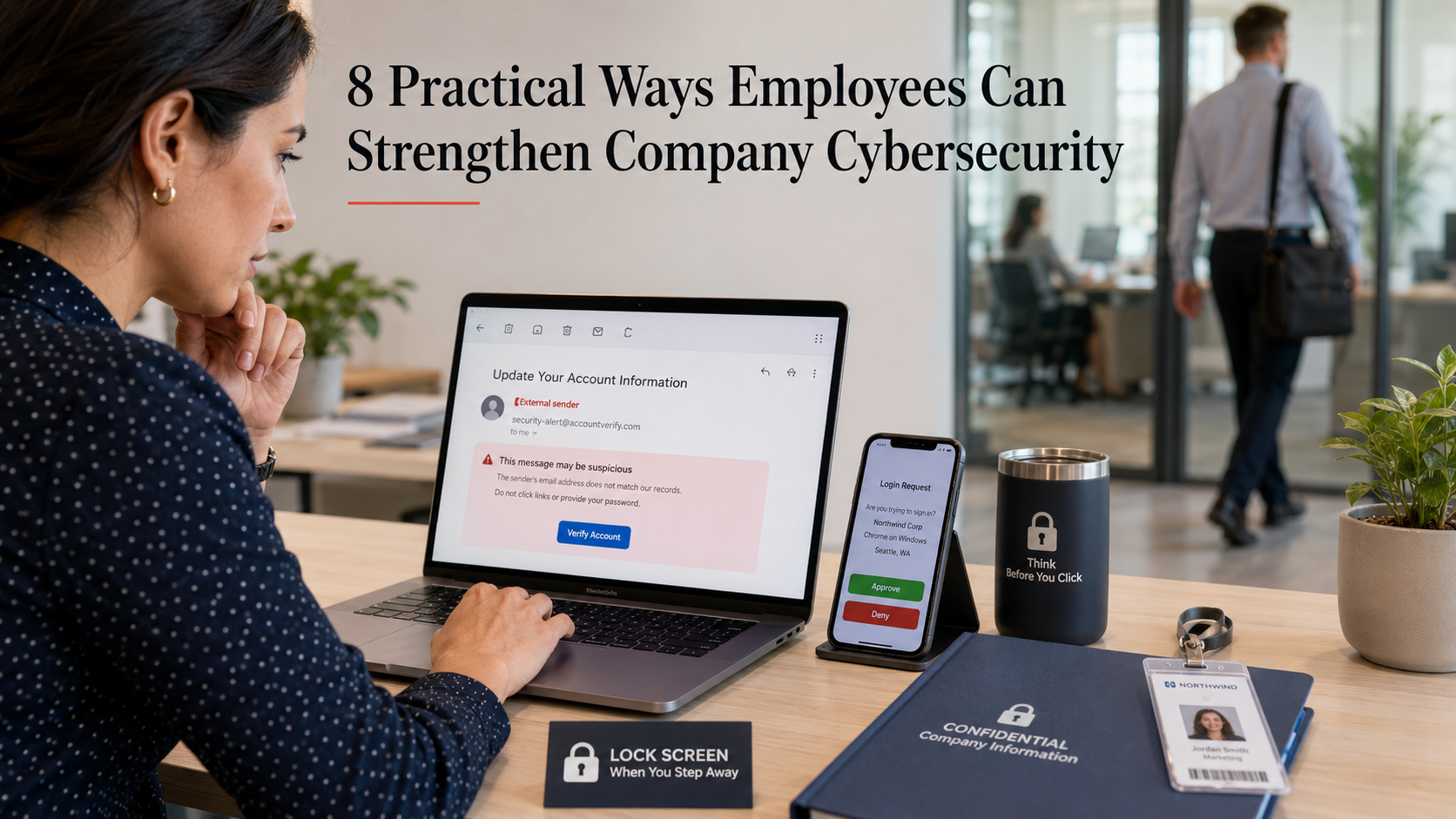
    8 Practical Ways Employees Can Strengthen Company Cybersecurity

    Most cyber incidents start with a normal workday moment. An unexpected email. A rushed login. A file shared with the wrong permissions. That is why employees matter so much.

    Security tools help, but daily habits decide a lot. Below are practical steps.

    Turn on multi-factor authentication (MFA) and keep it on

    If your company offers MFA, use it everywhere you can. Email, chat, payroll, cloud drives, admin panels. Turn it on once, then leave it on.

    Microsoft has published research showing MFA can block the vast majority of account compromise attempts. They cite more than 99% in some cases. If an attacker steals a password, MFA often stops the login from going anywhere.

    This also applies to personal accounts that touch work. Think of your personal email, your mobile carrier account, and your password manager. If those get taken over, work can be next.

    Use a password manager and stop reusing passwords

    Password reuse is still common because people are busy. A password manager fixes the problem in a clean way. It generates unique passwords and stores them safely.

    Canada’s Centre for Cyber Security recommends password managers and points out that stand-alone managers tend to be more secure than browser-only storage. They also recommend using MFA on the password manager itself.

    One detail people miss: your “main” password matters. Make it long. Make it memorable. A passphrase works well. If your manager supports it, add a second factor.

    Slow down around email, links, and attachments

    Email is still a top entry point for attackers. A useful habit is to treat unexpected messages like they are unsafe until proven otherwise. Especially when the email creates urgency. Especially when it asks you to sign in, open a file, or pay something.

    Basic checks help:

    • Hover over links before clicking.
    • Be wary of “shared document” messages you were not expecting.
    • Look closely at the sender’s address, not just the display name.
    • If you need to open a file, use the approved viewer and scanning tools your company provides.

    Verify payment and change of details requests

    Business Email Compromise is simple and nasty. A believable email asks for a wire transfer. Or it asks you to change bank details. Or it requests a “quick favor” with gift cards. These scams work because they match normal business processes.

    It is recommended to verify payment and purchase requests by calling the person (or confirming in person).

    Do not reply to the same email. Use a known phone number. Start a fresh chat with the person. If the request is real, nobody will mind the extra minute.

    Keep devices and apps updated

    Updates feel annoying until you connect them to risk. Attackers often exploit known weaknesses in older software versions.

    If your work device allows automatic updates, enable them. If it is managed by IT, do not fight the update prompts. Install them when you can. This also includes browsers, PDF readers, meeting apps, and password managers. Those are common targets because everyone uses them.

    Handle company data with care when sharing and storing

    A lot of leaks are not deliberate. They are accidental. A link shared with “anyone with the link.” A file dropped into the wrong folder. A spreadsheet emailed to the wrong “John.”

    Before you share, do two checks:

    • Who can access it?
    • For how long?

    Use the company’s approved storage tools. Avoid personal email for work files. Avoid moving data into consumer apps “just for convenience.” That convenience turns into shadow IT, and shadow IT turns into blind spots.

    If you work with sensitive data, keep it minimal. Do you need local copies? Do you need to download at all? If not, do the work in the secured system.

    Protect your workspace

    It still happens: someone walks past an unlocked laptop. A visitor tailgates through a door. A printed report sits on a desk overnight.

    Simple habits make a difference:

    • Lock your screen every time you stand up.
    • Keep badges and keys secure.
    • Do not let strangers “borrow” your access, even for a minute.
    • Be careful with speakerphone in public spaces.

    If you work remote, be extra strict on this one. Home and cafés blur lines fast.

    Report quickly, even when you are not 100% sure

    Reporting early gives security teams time. They can block a sender, remove similar messages from other inboxes, and reset access before damage spreads. Waiting “to be sure” often costs more than raising a false alarm.

    Also report near-misses. If you clicked a link and then realized it was odd, say so right away. Good security cultures do not punish people for speaking up. They learn from it.

    Closing thought

    Cybersecurity at work is mostly routine. It is small choices made consistently. MFA stays on. Passwords stay unique. Updates get installed.

    You do not need to be a security expert to make a real difference. You just need a few habits that hold up on busy days.